 View on TensorFlow.org |
 Run in Google Colab |
 View on GitHub |
 Download notebook |
 See TF Hub model |
TensorFlow Hub (TF-Hub) is a platform to share machine learning expertise packaged in reusable resources, notably pre-trained modules.
In this colab, we will use a module that packages the DELF neural network and logic for processing images to identify keypoints and their descriptors. The weights of the neural network were trained on images of landmarks as described in this paper.
Setup
pip install scikit-imagefrom absl import logging
import matplotlib.pyplot as plt
import numpy as np
from PIL import Image, ImageOps
from scipy.spatial import cKDTree
from skimage.feature import plot_matched_features
from skimage.measure import ransac
from skimage.transform import AffineTransform
from six import BytesIO
import tensorflow as tf
import tensorflow_hub as hub
from six.moves.urllib.request import urlopen
/tmpfs/src/tf_docs_env/lib/python3.11/site-packages/tensorflow_hub/__init__.py:61: UserWarning: pkg_resources is deprecated as an API. See https://setuptools.pypa.io/en/latest/pkg_resources.html. The pkg_resources package is slated for removal as early as 2025-11-30. Refrain from using this package or pin to Setuptools<81.
  from pkg_resources import parse_version
The data
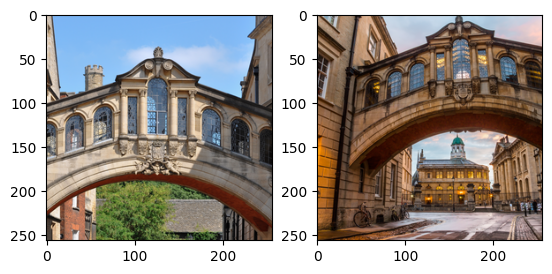
In the next cell, we specify the URLs of two images we would like to process with DELF in order to match and compare them.
Choose images
images = "Bridge of Sighs"
if images == "Bridge of Sighs":
  # from: https://commons.wikimedia.org/wiki/File:Bridge_of_Sighs,_Oxford.jpg
  # by: N.H. Fischer
  IMAGE_1_URL = 'https://upload.wikimedia.org/wikipedia/commons/2/28/Bridge_of_Sighs%2C_Oxford.jpg'
  # from https://commons.wikimedia.org/wiki/File:The_Bridge_of_Sighs_and_Sheldonian_Theatre,_Oxford.jpg
  # by: Matthew Hoser
  IMAGE_2_URL = 'https://upload.wikimedia.org/wikipedia/commons/c/c3/The_Bridge_of_Sighs_and_Sheldonian_Theatre%2C_Oxford.jpg'
elif images == "Golden Gate":
  IMAGE_1_URL = 'https://upload.wikimedia.org/wikipedia/commons/1/1e/Golden_gate2.jpg'
  IMAGE_2_URL = 'https://upload.wikimedia.org/wikipedia/commons/3/3e/GoldenGateBridge.jpg'
elif images == "Acropolis":
  IMAGE_1_URL = 'https://upload.wikimedia.org/wikipedia/commons/c/ce/2006_01_21_Ath%C3%A8nes_Parth%C3%A9non.JPG'
  IMAGE_2_URL = 'https://upload.wikimedia.org/wikipedia/commons/5/5c/ACROPOLIS_1969_-_panoramio_-_jean_melis.jpg'
else:
  IMAGE_1_URL = 'https://upload.wikimedia.org/wikipedia/commons/d/d8/Eiffel_Tower%2C_November_15%2C_2011.jpg'
  IMAGE_2_URL = 'https://upload.wikimedia.org/wikipedia/commons/a/a8/Eiffel_Tower_from_immediately_beside_it%2C_Paris_May_2008.jpg'
Download, resize, save and display the images.
def download_and_resize(name, url, new_width=256, new_height=256):
  path = tf.keras.utils.get_file(url.split('/')[-1], url)
  image = Image.open(path)
  image = ImageOps.fit(image, (new_width, new_height), Image.LANCZOS)
  return image
image1 = download_and_resize('image_1.jpg', IMAGE_1_URL)
image2 = download_and_resize('image_2.jpg', IMAGE_2_URL)

plt.subplot(1,2,1)
plt.imshow(image1)
plt.subplot(1,2,2)
plt.imshow(image2)
Downloading data from https://upload.wikimedia.org/wikipedia/commons/2/28/Bridge_of_Sighs%2C_Oxford.jpg
7013850/7013850 [==============================] - 0s 0us/step
Downloading data from https://upload.wikimedia.org/wikipedia/commons/c/c3/The_Bridge_of_Sighs_and_Sheldonian_Theatre%2C_Oxford.jpg
14164194/14164194 [==============================] - 1s 0us/step
<matplotlib.image.AxesImage at 0x7f3ab8737bd0>
Apply the DELF module to the data
The DELF module takes an image as input and will describe noteworthy points with vectors. The following cell contains the core of this colab's logic.
delf = hub.load('https://tfhub.dev/google/delf/1').signatures['default']
WARNING: All log messages before absl::InitializeLog() is called are written to STDERR
E0000 00:00:1794400471.173752   42937 cuda_platform.cc:52] failed call to cuInit: INTERNAL: CUDA error: Failed call to cuInit: CUDA_ERROR_NO_DEVICE: no CUDA-capable device is detected
def run_delf(image):
  np_image = np.array(image)
  float_image = tf.image.convert_image_dtype(np_image, tf.float32)

  return delf(
      image=float_image,
      score_threshold=tf.constant(100.0),
      image_scales=tf.constant([0.25, 0.3536, 0.5, 0.7071, 1.0, 1.4142, 2.0]),
      max_feature_num=tf.constant(1000))
result1 = run_delf(image1)
result2 = run_delf(image2)
Use the locations and description vectors to match the images
TensorFlow is not needed for this post-processing and visualization
def match_images(image1, image2, result1, result2):
  distance_threshold = 0.8

  # Read features.
  num_features_1 = result1['locations'].shape[0]
  print("Loaded image 1's %d features" % num_features_1)

  num_features_2 = result2['locations'].shape[0]
  print("Loaded image 2's %d features" % num_features_2)

  # Find nearest-neighbor matches using a KD tree.
  d1_tree = cKDTree(result1['descriptors'])
  _, indices = d1_tree.query(
      result2['descriptors'],
      distance_upper_bound=distance_threshold)

  # Select feature locations for putative matches.
  locations_2_to_use = np.array([
      result2['locations'][i,]
      for i in range(num_features_2)
      if indices[i] != num_features_1
  ])
  locations_1_to_use = np.array([
      result1['locations'][indices[i],]
      for i in range(num_features_2)
      if indices[i] != num_features_1
  ])

  # Perform geometric verification using RANSAC.
  _, inliers = ransac(
      (locations_1_to_use, locations_2_to_use),
      AffineTransform,
      min_samples=3,
      residual_threshold=20,
      max_trials=1000)

  print('Found %d inliers' % sum(inliers))

  # Visualize correspondences.
  _, ax = plt.subplots()
  inlier_idxs = np.nonzero(inliers)[0]
  plot_matched_features(
      image1,
      image2,
      keypoints0=locations_1_to_use,
      keypoints1=locations_2_to_use,
      matches=np.column_stack((inlier_idxs, inlier_idxs)),
      ax=ax,
  )

  ax.axis('off')
  ax.set_title('DELF correspondences')

  for line in ax.lines:
    line.set_color('b')
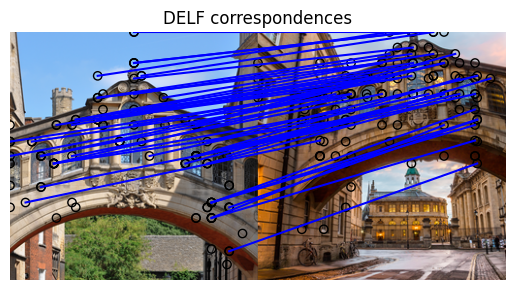
match_images(image1, image2, result1, result2)
Loaded image 1's 233 features
Loaded image 2's 262 features
Found 51 inliers